Gamdom KYC: Verification Triggers, Levels and Documents
 Available in US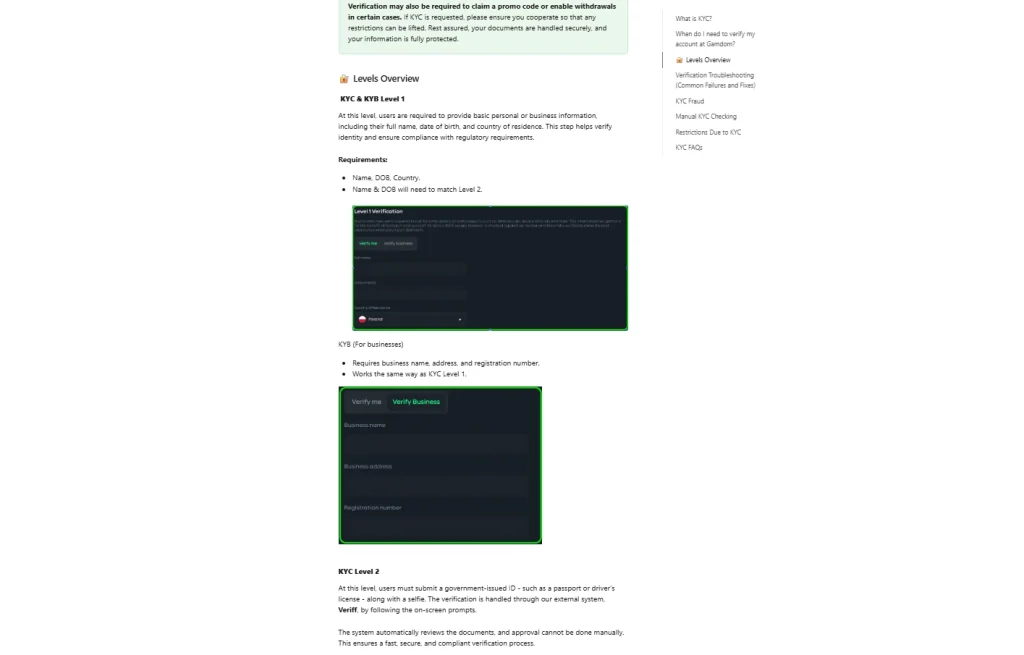
Gamdom Australia Guide
Updated 8 September 2026
Gamdom uses conditional KYC rather than requiring every account to complete identity verification at the same moment. Its current official Help Center says verification can be requested for withdrawals, promotions and compliance or risk checks. The same page currently describes three KYC levels: Level 1 basic personal information, Level 2 government-issued ID plus a selfie, and Level 3 proof of funds or income.
Document requirements and verification timings can change, so the current official KYC article is the reference for the details below as of 8 September 2026. Gamdom currently says automated self-verification is usually completed within a few minutes when documents are submitted correctly. That is the brand’s current general timing statement, not a guaranteed completion time for every account.
Table of Contents
- Gamdom KYC at a glance
- When Gamdom can request verification
- Level 1: basic personal information
- Level 2: government-issued ID and selfie
- Level 3: proof of funds or income
- Additional proof-of-address requests
- How long Gamdom verification can take
- What happens when KYC affects a withdrawal
- KYC and promotions
- Common document rejection reasons
- Manual verification and support
- Verification checklist
- Gamdom KYC FAQ
- Sources checked for this KYC guide
- Recommend
Gamdom KYC at a glance
| Stage | Current official description | Practical purpose |
|---|---|---|
| Conditional trigger | KYC can be requested for withdrawals, promotions, regulatory checks or risk-related activity. | An account can move into verification after it has already been created. |
| Level 1 | Full name, date of birth and country of residence. | Establishes core personal information and must align with later identity data. |
| Level 2 | Government-issued ID such as a passport or driver’s licence, plus a selfie. | Confirms identity through the verification flow. |
| Level 3 | Proof of funds or income, with examples including payslips, invoices or bank statements. | Supports higher-level source-of-funds or compliance review. |
| Additional request | Proof of address can be requested in some cases. | Adds address confirmation when the account review requires it. |
When Gamdom can request verification
Gamdom’s current KYC article says users can typically deposit, play and withdraw without completing KYC unless the team specifically requests it. That wording is important because it describes a conditional process, not a promise of permanent anonymous use. The same article explains that verification can be triggered by regulatory checks, abuse or fraudulent gameplay concerns, certain withdrawals and some promotion-related actions.
For users, the practical implication is that KYC risk is event-based. An account that has not been asked for documents during registration can still receive a verification request later. A withdrawal, a promotion claim or a compliance review can change the account’s required verification state.
This is why “no KYC at sign-up” and “no KYC casino” are not interchangeable statements. The first can describe an initial experience for some users; the second suggests identity checks will never occur. Gamdom’s current documentation does not support that broader claim.
Level 1: basic personal information
Gamdom’s current official KYC page describes Level 1 as the basic-information stage. It currently asks for the user’s name, date of birth and country of residence. The page also says the name and date of birth at Level 1 need to match the information used at Level 2.
The practical value of this stage is consistency. If basic account information is entered inaccurately, later identity checks can become harder because the verification flow compares personal information across stages. Users should therefore treat Level 1 data as identity information, not as disposable profile text.
For Australian readers, entering a country of residence is also not a substitute for verifying whether the service is permitted or available for that location. KYC country support, registration availability and the legal status of online casino services are different questions. The broader operator and regulatory context belongs in the Gamdom trust and licence guide.
Level 2: government-issued ID and selfie
At Level 2, Gamdom’s current official page lists a government-issued ID, such as a passport or driver’s licence, together with a selfie. The article also notes that additional details can be requested depending on country of residence.
Because the exact document list is a residual high-risk field, this page does not generalise beyond what the official article currently states. A document accepted for another user, another country or an older version of the flow is not reliable evidence that it will be accepted in a new submission.
The strongest preparation is therefore basic: use a current, readable identity document, make sure the image is not cropped or obscured, and follow the instructions shown in the live verification flow. Gamdom’s troubleshooting section specifically identifies poor image quality, unreadable data, expired documents, damaged documents and unsupported document types as reasons a submission can fail.
Level 3: proof of funds or income
Gamdom describes Level 3 as proof-of-funds verification. Its current official guidance gives examples including payslips, invoices and bank statements. The article says this level cannot be completed proactively and is requested only in certain cases, typically for regulatory or compliance reasons.
Level 3 should therefore be understood as a different verification objective from Level 2. Level 2 is focused on identity; Level 3 is focused on the origin or legitimacy of funds. A user who has already passed an identity check can still receive a later source-of-funds request because the two checks answer different questions.
This distinction also helps with troubleshooting. If the account is waiting on proof of funds, repeatedly resubmitting an identity photo is unlikely to address the actual request. The user should identify the verification level shown in the account and provide the category of evidence currently requested.
Additional proof-of-address requests
Gamdom’s current KYC article says proof of address can be requested in some cases as an additional verification step. The article does not present proof of address as a universal Level 2 requirement for every account, so this guide does not turn it into one.
That distinction matters because casino reviews often collapse every possible compliance document into a single fixed checklist. The current Gamdom process is better described as layered: basic personal information, identity verification, possible proof of funds, and additional documents when the account review requires them.
If proof of address is requested, follow the live instructions for that account rather than relying on a generic list copied from another operator. The official page says manually requested documents can be shared through live chat or email when that route is required.
How long Gamdom verification can take
Gamdom’s current official KYC FAQ says self-verification on the account is usually completed within a few minutes when documents are submitted correctly. This is a general timing statement rather than a guaranteed completion time for every account.
“Usually within a few minutes” should not be converted into a guaranteed service-level commitment. A submission can fail automated checks, require resubmission, move into manual review or involve an additional document request. The same official page includes troubleshooting for declined documents and says support can help users understand rejection reasons and resubmit when possible.
For that reason, the useful question is not only “How many minutes?” but “What state is the verification in?” A clean automated approval, a rejected document, a manual KYC request and a Level 3 proof-of-funds review are different workflows and should not be expected to resolve on the same timetable.
What happens when KYC affects a withdrawal
Gamdom’s current KYC page says withdrawals can be temporarily disabled until required verification checks are completed. That is the key connection between identity verification and cashout: a withdrawal problem can be a payment-processing issue, but it can also be an account-compliance issue.
If the withdrawal itself has already been submitted, first determine whether the account is showing a KYC request or a normal transaction status. The Gamdom withdrawals guide explains the separate withdrawal statuses and processing sequence. Keeping the two processes distinct avoids treating every delay as a verification failure.
If the account specifically requests KYC, complete the requested verification stage before repeatedly retrying the withdrawal. A new withdrawal attempt does not remove an identity or compliance requirement that is already attached to the account.
KYC and promotions
Gamdom’s current documentation says verification can also be required to claim a promotion or promo code in certain cases. This means promotion eligibility is not only a question of whether an offer appears on the account. The account may need to satisfy an additional verification condition before a reward can be used or released.
Users should therefore read an on-screen KYC request as part of the current account state rather than as a generic technical error. The same principle applies to withdrawal restrictions. The trigger tells you which workflow to follow next.
The main Gamdom account guide covers registration and security mechanics. KYC belongs here because document levels and verification states are a separate decision point from creating credentials.
Common document rejection reasons
Gamdom’s official troubleshooting section lists several reasons documents can be rejected: poor image quality, unsupported document type, important data not being visible, obscured information, damaged documents, expired documents and a surname not being detected. These are useful because they point to specific fixes rather than encouraging repeated identical submissions.
- Retake a blurry image so the full document is sharp and legible.
- Use a currently accepted government-issued document rather than a student or work badge.
- Keep names, dates and other required fields visible and uncropped.
- Use a valid, unexpired document in good physical condition.
- Check that the personal information entered at Level 1 matches the identity document used at Level 2.
If the same problem continues after correcting the visible issue, contact support rather than altering or digitally manipulating the document. Gamdom’s KYC guidance says tampering, fake documents or documents belonging to someone else can lead to restrictions or closure.
Manual verification and support
Gamdom says that if verification cannot be completed directly on the account, a user can be asked to submit documents manually through email or live chat for review. The brand advertises 24/7 live-chat support and lists [email protected] as its support email.
When escalating a verification issue, describe the verification level, the error shown and whether the issue is blocking a withdrawal or promotion. That gives support a clearer starting point than a generic request saying only that KYC does not work. Do not send identity documents to a social-media account or an address supplied by an unsolicited message.
This guide does not promise a manual-review completion time or guaranteed approval. The official page supports a route for review and resubmission, but the outcome depends on the documents and account circumstances.
Verification checklist
- Read the exact verification request shown on the account before uploading anything.
- Confirm whether the request is Level 1 information, Level 2 identity, Level 3 proof of funds, or an additional document request.
- Use a current government-issued ID and selfie when Level 2 requires them.
- Keep images clear, uncropped and readable.
- Make sure Level 1 name and date-of-birth data match the Level 2 identity document.
- Do not treat “usually within a few minutes” as a guaranteed approval deadline.
- If a withdrawal is blocked, distinguish the KYC requirement from the normal withdrawal processing stage.
- Use official live chat or support email if the verification flow cannot be completed.
Gamdom KYC FAQ
Is Gamdom a no-KYC casino?
No. Gamdom describes KYC as conditional and says verification can be requested for withdrawals, promotions, regulatory checks and risk-related reasons.
What does Gamdom Level 2 KYC currently require?
The current official page lists a government-issued ID such as a passport or driver’s licence, plus a selfie. Additional information can depend on country of residence.
What is Level 3 verification?
Gamdom describes Level 3 as proof-of-funds or income verification and gives examples including payslips, invoices and bank statements.
How quickly is Gamdom self-verification approved?
Gamdom currently says self-verification is usually completed within a few minutes when documents are submitted correctly. That is not a guarantee for every account or manual review.
Can KYC stop a withdrawal?
Yes. Gamdom’s current KYC article says withdrawals can be temporarily disabled until required verification checks are completed.
Sources checked for this KYC guide
Recommend
Gamdom Rewards and Promotions: Bonuses, GAM15 and Rakeback
Gamdom Australia Guide Updated 8 September 2026 Gamdom currently focuses on personalised rewards and promotions...

Gamdom Games: Slots, Originals, Live Casino and Providers
Gamdom Australia Guide Updated 8 September 2026 Gamdom has a broad casino catalogue spanning slots,...

Is Gamdom Legit? Licence, Operator, Reputation and Australia Context
Gamdom Australia Guide Updated 8 September 2026 Gamdom is an identifiable operating casino brand with...

Gamdom Payment Methods: Crypto, Cards and Australian Context
Gamdom Australia Guide Updated 8 September 2026 Gamdom globally documents a broad cryptocurrency cashier covering...

Gamdom App and Mobile Casino: iOS, Android and Browser Access
Gamdom Australia Guide Updated 8 September 2026 No dedicated native Gamdom casino app for iOS...
Gamdom Account and Registration: Sign-Up, Security and Verification
Gamdom Australia Guide Updated 8 September 2026 Gamdom currently documents four account-creation methods: email and...