Gamdom App and Mobile Casino: iOS, Android and Browser Access
 Available in US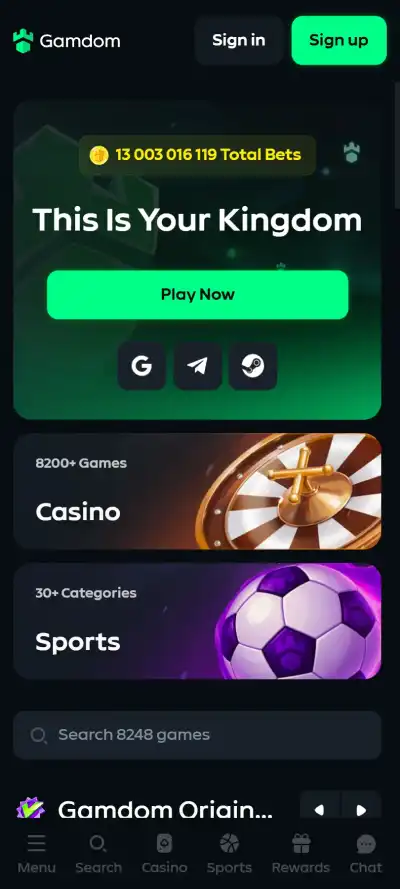
Gamdom Australia Guide
Updated 8 September 2026
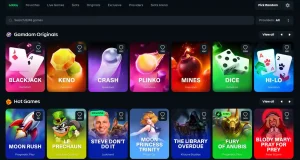
No dedicated native Gamdom casino app for iOS or Android is currently verified. Two independent 2026 reviews checked for a downloadable app and reached the same conclusion: the practical mobile route is Gamdom’s website in a phone or tablet browser. The browser site works on iOS and Android, so there is no verified reason to download a third-party APK or assume that an app-store result using the Gamdom name is an official casino application.
Where your browser supports it, you can add the website to your home screen as a shortcut for one-tap access. That creates an app-like launcher, not a native Gamdom app. For Australian readers, mobile compatibility is only a product-access fact; it is not a statement that online casino services are legally available in Australia.
Table of Contents
- Gamdom mobile access at a glance
- There is no verified native Gamdom iOS or Android app
- How to use Gamdom on iPhone or iPad
- How to use Gamdom on Android
- What the mobile browser route covers
- Navigation on a smaller screen
- Home-screen shortcut versus native app
- Security checks before using Gamdom on a phone
- Support from mobile
- Australian readers: mobile access is not a legality signal
- When the browser-only model is a good fit
- Gamdom app FAQ
- Sources checked for this mobile guide
- Recommend
Gamdom mobile access at a glance
| Question | Verified answer | Practical implication |
|---|---|---|
| Native iPhone app? | No dedicated official native iOS casino app is currently verified. | Use the website in a mobile browser instead of looking for an App Store download. |
| Native Android app or APK? | No dedicated official native Android casino app is currently verified. | Do not rely on third-party APK downloads presented as Gamdom. |
| Mobile browser? | Supported on iOS and Android browsers. | Open the official website directly and use the responsive web interface. |
| Home-screen shortcut? | Current independent testing documents an Add to Home Screen route. | This provides faster launching but remains a browser shortcut, not a native app. |
| Account security? | Gamdom supports authenticator-app two-factor authentication. | Keep 2FA active when using the account from a phone, especially on a device used outside the home. |
There is no verified native Gamdom iOS or Android app
The most important point on an app-intent page is also the easiest one to obscure: current independent reviews do not identify a dedicated native Gamdom casino application for either major mobile operating system. Casinos.org describes the product as a mobile-optimised browser site with no native app, and CoinStats likewise says there is no dedicated Gamdom app and directs users to the mobile website.
That means a search for “Gamdom app download” should not be treated like a normal App Store or Google Play search. The verified route is web access. A file labelled as a Gamdom APK is not made official simply because it uses the brand name, logo or familiar casino imagery. This guide does not distribute APK files, mirror downloads or third-party installation packages.
The distinction matters for security as much as convenience. A native app has a store listing, publisher identity, version history and a signed software package. A browser shortcut simply opens a website. When the verified product is browser-based, adding an unverified executable or mobile package creates unnecessary risk without adding a capability that the current evidence says Gamdom requires.
How to use Gamdom on iPhone or iPad
On iOS, the current route is to open the official Gamdom website in a browser. CoinStats’ 2026 mobile review documents the use of Safari and the standard Add to Home Screen function. That function places a shortcut on the device so the site can be launched from the home screen without searching for it each time.
The shortcut should not be described as an App Store installation. It is a browser-created entry point to the website. Removing the shortcut does not uninstall a native Gamdom application because no native iOS casino app is currently verified. Likewise, the browser’s privacy, cookie and storage settings remain relevant because the session is web-based.
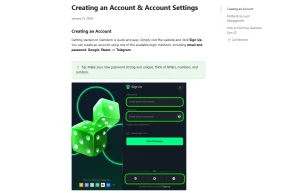
For account security, Gamdom’s official Help Center confirms authenticator-app two-factor authentication. The security guide says 2FA is used in login and withdrawal flows and explains how to link an authenticator application. If you use Gamdom from an iPhone, that security layer is more meaningful than trying to find an unofficial app-store substitute.
How to use Gamdom on Android
Android follows the same basic model: access Gamdom through the mobile website rather than installing a verified native Gamdom APK, because no dedicated native Android application is currently confirmed. CoinStats documents the browser shortcut route on Android as well, using the browser’s Add to Home Screen option.
This is a useful distinction when search results or download sites use phrases such as “Gamdom APK”. An APK is an Android installation package. The current evidence does not establish an official Gamdom casino APK as the normal access method, so there is no basis for this guide to direct readers to one. The lower-risk approach is to navigate to the official domain directly and keep the interaction inside the browser.
Android users can still create a convenient launcher icon through their browser if supported. That shortcut can make access feel more app-like, but it does not change the underlying delivery model. Updates to the website happen on the web side rather than through a native app package that the user installs from a store.
What the mobile browser route covers
Current independent mobile reviews describe the browser route as covering Gamdom’s casino and sportsbook areas. Gamdom’s own security material separately confirms authenticator-app 2FA for account protection. The platform is therefore better understood as a responsive website rather than a desktop-only casino with a stripped-down phone page.
For casino browsing, use the same category logic described in the Gamdom games guide: begin with the broad game family and narrow from there. Live-dealer content is more visually demanding than a menu or account page, so the practical experience will depend on the phone, browser and connection. This review does not publish unmeasured claims about load time, frame rate or data consumption.
Payment questions should be checked against the dedicated Gamdom payment methods guide rather than inferred from the fact that the website opens on a phone. The same separation applies to registration and security. Mobile compatibility tells you how the interface is delivered; it does not by itself validate a payment rail, a withdrawal time or an account requirement.
Navigation on a smaller screen
A responsive mobile site has to compress more functions into less space, so the useful question is not whether the page looks identical to desktop. It is whether the important areas remain reachable without a separate download. Current independent reviews consistently describe Gamdom’s mobile experience as browser-based and identify casino and sports navigation as part of that web route.
Because menu positions can change, this guide does not freeze a button-by-button map into the article. Exact navigation should be checked in the live mobile interface as it exists on the day of use. This avoids a common documentation problem where precise menu instructions become wrong after a site redesign.
The same principle applies to promotional panels and account tools. Instead of assuming a permanent location, use descriptive tasks: open the relevant casino area, go to the wallet or account section through the current menu, and confirm the action on the live site. The dedicated Gamdom account guide covers registration and account setup in more depth.
Home-screen shortcut versus native app
The home-screen shortcut is the closest thing to an “app” that the current evidence supports. On compatible browsers, it creates an icon that opens the Gamdom website directly. CoinStats documents this route for both Android and iOS. It speeds up return access but does not convert the website into a verified native casino application.
That distinction affects expectations. A browser shortcut does not prove the presence of native-only features such as an App Store update channel, a Google Play developer page or operating-system-specific integrations. This guide does not claim those features because the underlying native app is not verified.
For readers comparing mobile casinos, this can be a positive or negative depending on preference. Some users prefer not to install another app and are comfortable with a browser shortcut. Others specifically want a store-managed native application. Gamdom currently fits the first model, so the decision should be based on that actual delivery method rather than on the word “app” in search queries.
Security checks before using Gamdom on a phone
Mobile access increases the importance of checking the destination before entering account credentials. Start from the official Gamdom domain rather than from an unknown APK repository, sponsored download page or imitation store listing. A familiar logo is not enough to establish that software is official.
Gamdom’s official security documentation supports authenticator-app 2FA and says it is used for login and withdrawal security flows. Enabling it adds a second factor beyond the account password. The Help Center also warns generally about impersonation and advises users to verify suspicious contacts through official support channels.
Basic device hygiene matters too: keep the operating system and browser current, protect the device with its normal lock method, and avoid saving credentials in places other people can access. Those are general security practices, not Gamdom-specific performance promises. If account activity looks suspicious, use the site’s official support channel rather than a contact provided by an unsolicited message.
Support from mobile
Gamdom advertises 24/7 live-chat support, and its current Help Center repeatedly directs users to live chat or support email for account and technical issues. That support availability is separate from dealer chat inside a live game. The customer-support channel is the relevant one for login, account-security or site problems.
For a mobile user, the practical value is that a support request does not depend on having a native casino application. The account and support model is web-centred, and the official Help Center directs users to live chat or support email for assistance.
Do not use support claims to infer guaranteed response times. This page confirms that support is advertised as available around the clock; it does not promise a particular queue length or resolution time on a given day.
Australian readers: mobile access is not a legality signal
A website working in a mobile browser does not establish that the underlying gambling service may lawfully be offered to people in Australia. ACMA’s current Interactive Gambling Act guidance says online casinos are among the services that providers are prohibited from offering to people in Australia.
That legal context is deliberately kept short here because this page answers an app and device question. The verified product conclusion remains: there is no dedicated native Gamdom iOS or Android casino app currently confirmed, and the documented mobile route is browser access. The regulatory conclusion is separate and should not be inferred from whether a page loads on a phone.
When the browser-only model is a good fit
The browser route is a good fit for someone who wants one website across phone, tablet and desktop and does not care about installing a store-managed casino app. It also avoids the need to obtain a casino APK from outside the normal app stores. The trade-off is that users specifically looking for a native application will not find a currently verified one.
From an editorial perspective, this is also why the page should not be padded with fake download instructions. There is no need for a multi-step installation guide when the verified route is simply the web. The useful guidance is authenticity, browser access, shortcut creation where supported, account security and realistic expectations about what “app” means in this context.
If you are comparing mobile access with other parts of the product, use the site structure rather than duplicating those reviews here. The games page covers catalogue breadth, the payments page covers funding routes, the account page covers registration and security, and the Gamdom trust and licence guide covers operator and licensing questions.
Gamdom app FAQ
Does Gamdom have an official iPhone app?
No dedicated native Gamdom casino app for iOS is currently verified. Current 2026 independent reviews describe the iPhone route as mobile-browser access.
Is there an official Gamdom Android APK?
No dedicated native Gamdom Android app or APK is currently verified as the normal casino access route. This guide therefore does not link to third-party APK downloads.
Can I add Gamdom to my phone’s home screen?
Yes, where the browser supports that standard function. Current independent testing documents Add to Home Screen shortcuts on both iOS and Android. The shortcut still opens the website rather than installing a native casino app.
Does Gamdom support two-factor authentication on mobile?
Gamdom supports authenticator-app 2FA for account security. Its official Help Center describes 2FA as part of login and withdrawal security flows.
Can I use the casino and sportsbook from the mobile website?
Current independent 2026 mobile reviews describe both casino and sportsbook access through the browser-based site. Individual features and layouts can change, so the current website remains the best place to confirm a specific function.